07 Functions of multiple variables, part 3

Functions as transformations

  • We may try to visualize a function \(f:\mathbb{R}^m \to \mathbb{R}^n\) via its graph, as we’ve seen.

  • However, we can also think of \(f\) as a physical transformation of \(\mathbb{R}^m\) into \(\mathbb{R}^n\).

  • This will allow us to visualize functions all the way up to \(\mathbb{R}^3 \to \mathbb{R}^3\).

Exercise 1: Functions \(\mathbb{R} \to \mathbb{R}\) as transformations

Describe the action of the following functions \(\mathbb{R} \to \mathbb{R}\) as physical transformations of the real line into itself. Draw pictures!

  1. \(f(x) = x^2\)
  2. \(g(x) = 2x+1\)
  3. \(h(x) = -x-1\)
  4. \(k(x) = x^3\)
  5. \(j(x) = \sin{x}\)

Exercise 2: Functions \(\mathbb{R} \to \mathbb{R}^2\) as transformations

Describe the action of the following functions \(\mathbb{R} \to \mathbb{R}^2\) as physical transformations of the real line into the plane. Draw pictures!

  1. \(f(t) = (t, t^2)\)
  2. \(g(t) = (2t+1, -t)\)
  3. \(h(t) = (\cos{t}, \sin{t})\)
  4. \(k(t) = (\sin{t}, \cos{t})\)
  5. \(j(t) = (t^2, t^3)\)

Exercise 3: Comparison to linear functions, part 1

Compare the function \(j(t) = (t^2, t^3)\) from the previous exercise to the linear function \(L:\mathbb{R} \to \mathbb{R}^2\) defined by \(L(t) = (2t-1,3t-2)\) at the point \((1,1)\). Draw pictures!

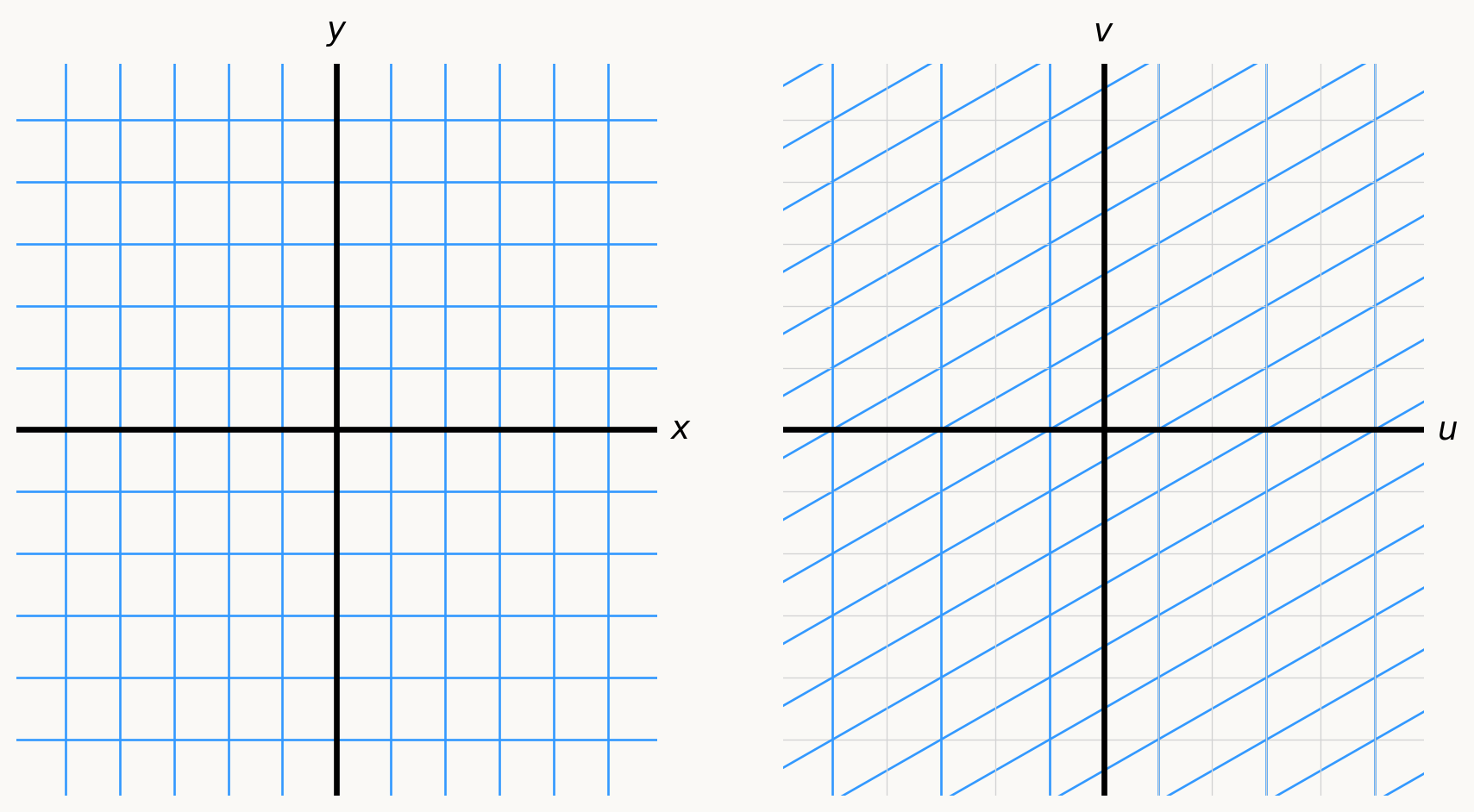
Exercise 4: A linear function \(f:\mathbb{R}^2 \to \mathbb{R}^2\) as a transformation

Define a function \(f:\mathbb{R}^2 \to \mathbb{R}^2\) by \[ (u,v) = f(x,y) = (2x+1, x-y-1). \] Describe the action of \(f\) as a physical transformation of the plane into itself. Draw pictures!

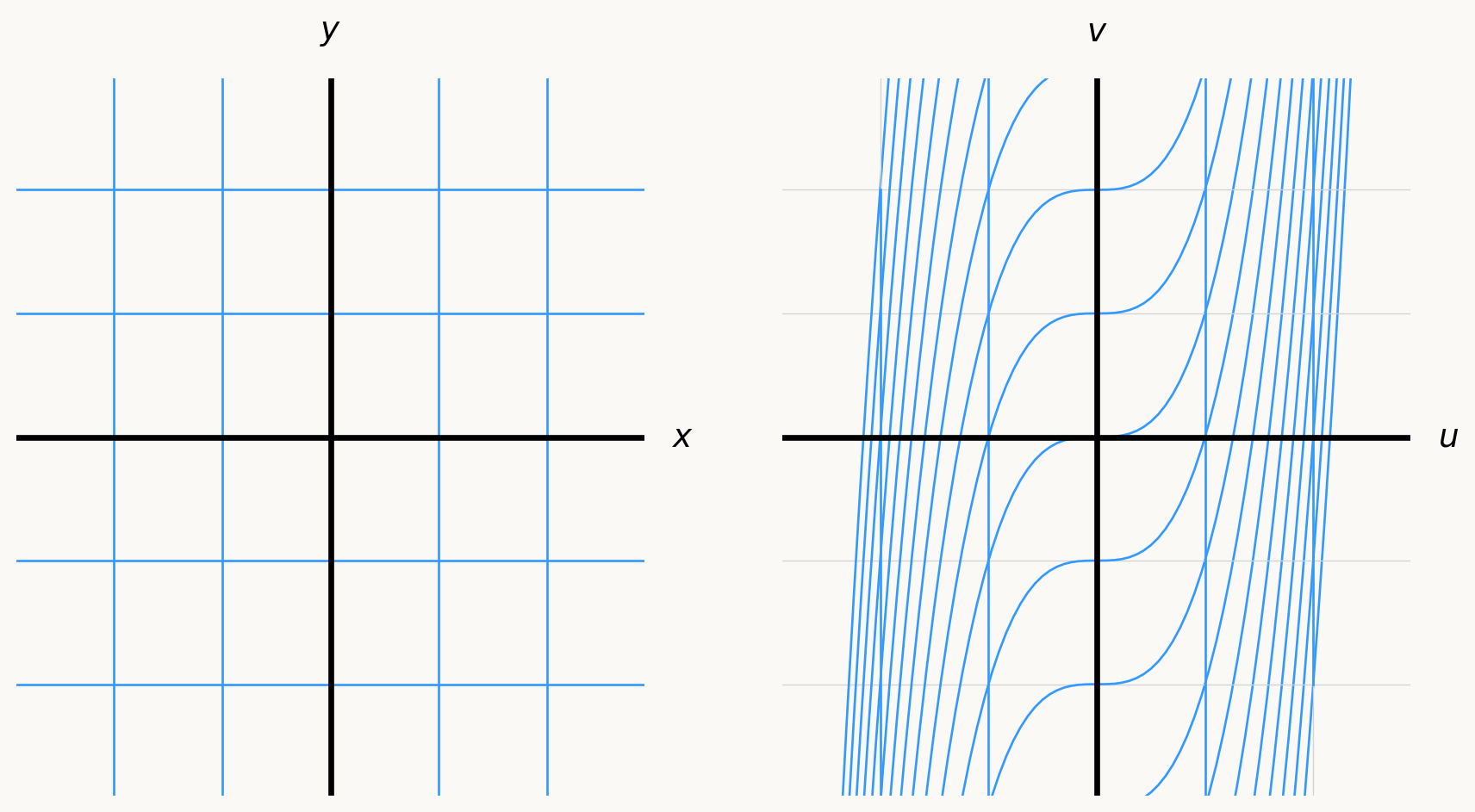
Exercise 5: A nonlinear function \(g:\mathbb{R}^2 \to \mathbb{R}^2\) as a transformation

Define a function \(g:\mathbb{R}^2 \to \mathbb{R}^2\) by \[ (u,v) = g(x,y) = (x, x^3 + y ). \] Describe the action of \(g\) as a physical transformation of the plane into itself. Draw pictures!

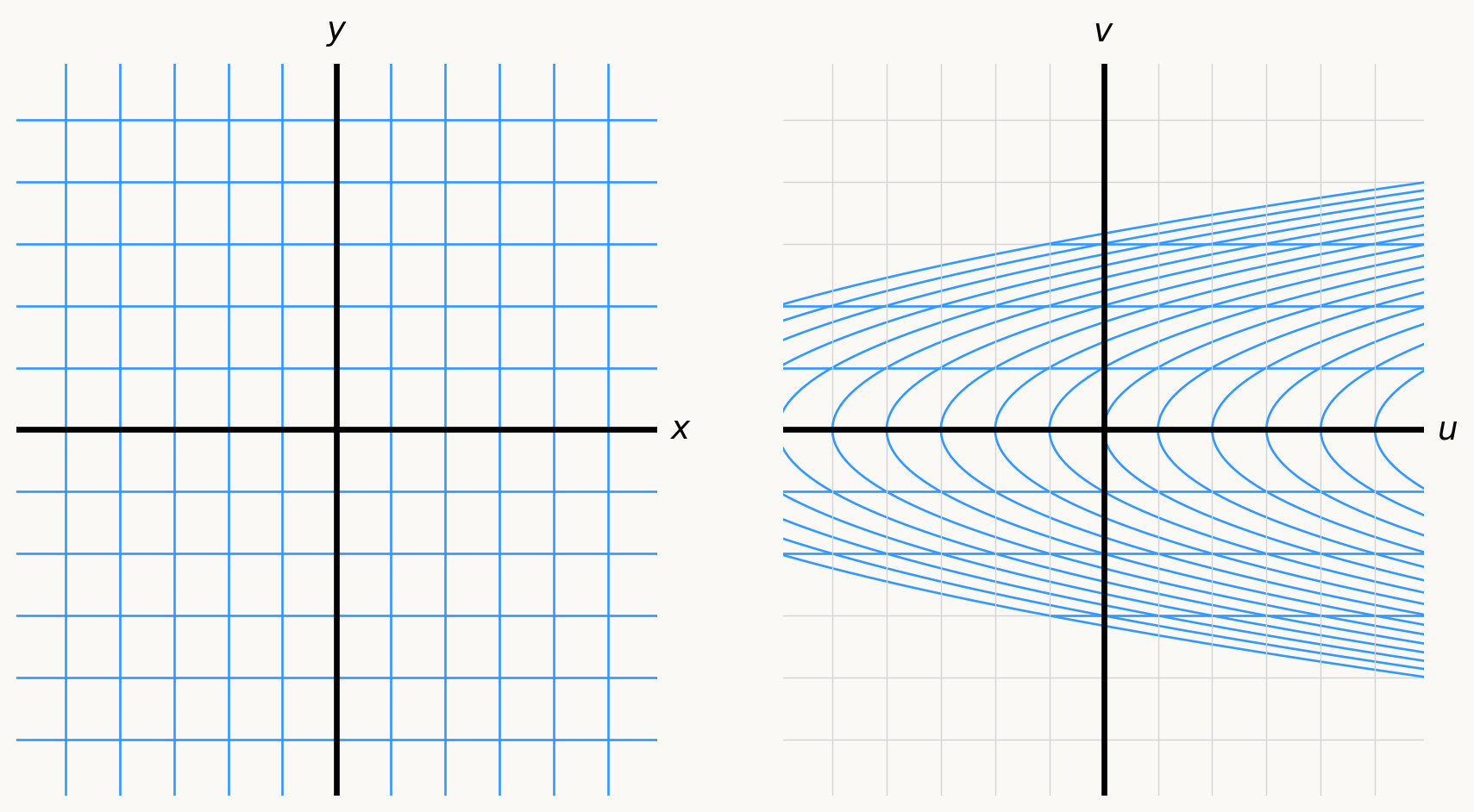
Exercise 6: A nonlinear function \(k:\mathbb{R}^2 \to \mathbb{R}^2\) as a transformation

Define a function \(k:\mathbb{R}^2 \to \mathbb{R}^2\) by \[ (u,v) = k(x,y) = (y^2 +x, y). \] Describe the action of \(k\) as a physical transformation of the plane into itself. Draw pictures!

Comparison to linear functions, part 2

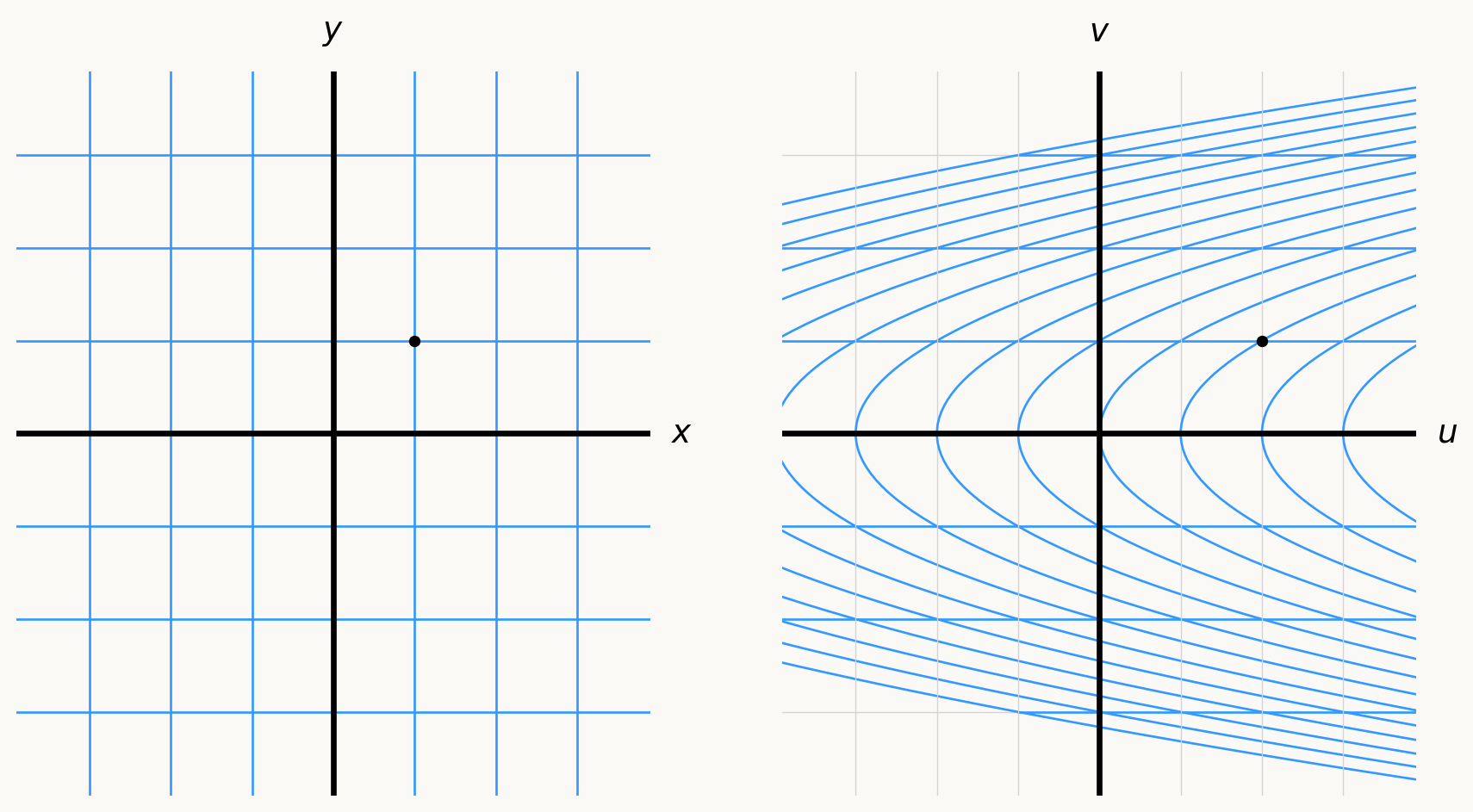
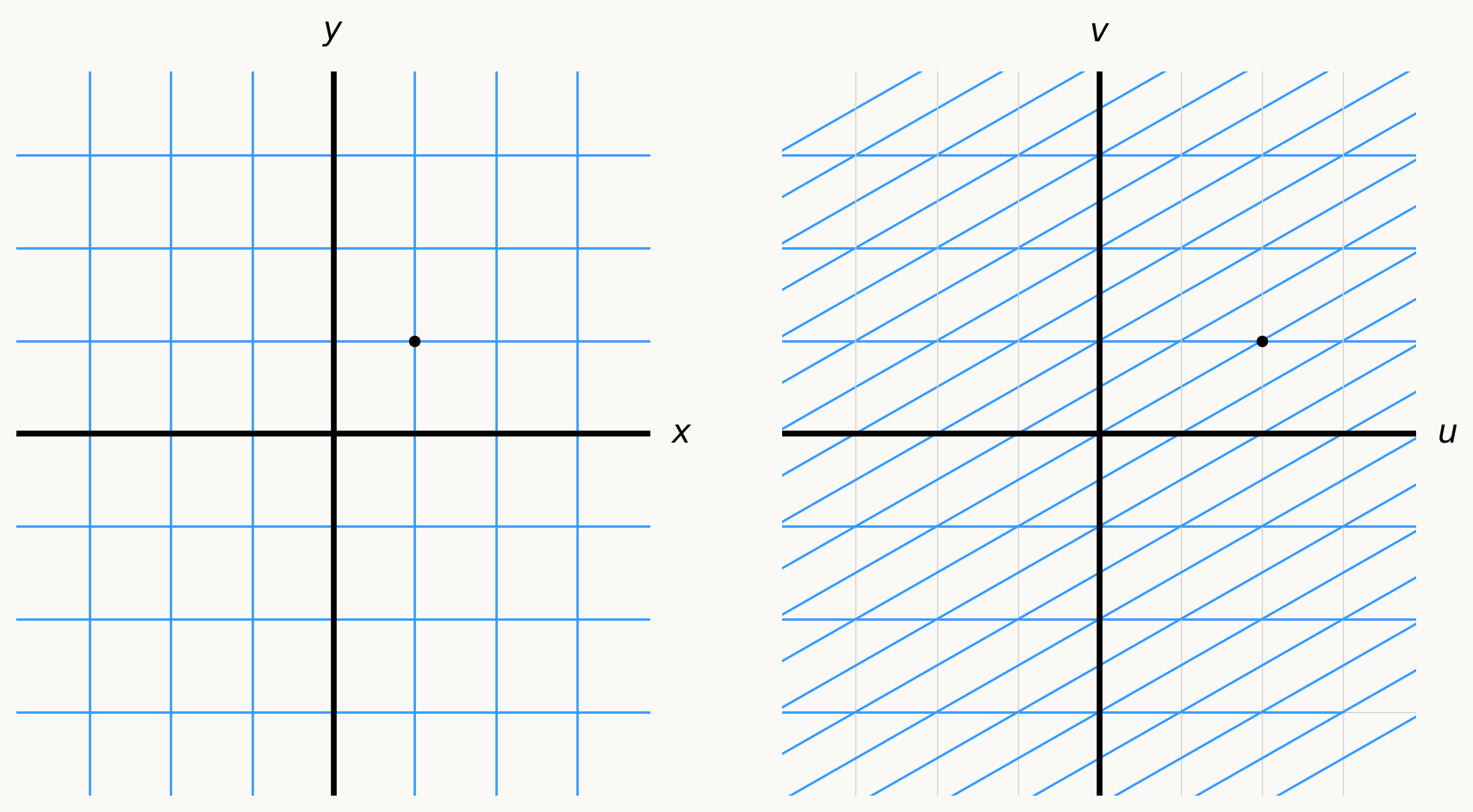
  • Return to the function \(k(x,y) = (y^2 + x, y)\), and focus on a point in the \(xy\)-plane, say \((1,1)\), and look at its image in the \(uv\)-plane, which is \((2,1)\):

  • Now consider the linear function \(L:\mathbb{R}^2 \to \mathbb{R}^2\) defined by \(L(x,y) = (x+2y-1,y)\), and focus on the same points:

  • Do you notice how that, if you only compare the graphs in the \(uv\)-plane near the point \((2,1)\), the function \(k\) looks a lot like the linear function \(L\)? That’s because \(L\) is the “best” linear approximation of \(k\) near \((1,1)\), cooked up using the derivative of \(k\) at \((1,1)\).

  • Same story here as in single-variable calculus. Nothing new conceptually.